
Google Colab, otherwise known as Google Colaboratory, is one of the most widely used cloud-based solutions for programming in Python, data science, artificial intelligence, and machine learning. You can develop, execute, and share Jupyter notebooks through your web browser without setting up Python on your machine. Google Colab provides access to free cloud computing resources with GPUs and TPUs and some paid plans that offer better resources and longer runtimes.
Regardless of whether you are learning Python, training neural networks, or building AI applications, Google Colab provides you with a fast coding environment to work from any device.
Table of Contents
What Is Google Colab?
Google Colab is a cloud-based Jupyter Notebook application by Google. All that is needed to use it is available in the cloud; you can develop, execute, and visualize your Python code without any installations on your machine.
Popular uses include:
- Python programming
- Machine learning
- Deep learning
- Data analysis
- Scientific research
- Educational projects
- AI experimentation
- Data visualization
Why Google Colab Is So Popular
Several features have made Google Colab a favorite among developers and researchers.
No Installation Required
Everything runs inside your browser.
There is no need to install:
- Python
- Jupyter Notebook
- TensorFlow
- PyTorch
- CUDA
- GPU drivers
It significantly decreases the time required to set up the environment.
Free Cloud Computing
This variant offers cloud computing resources including CPUs and also GPUs and TPU’s, whenever available, to facilitate machine learning tasks.
Integration With Google Drive
Notebooks can be:
- Automatically saved
- Shared with colleagues
- Classified in folders
- Used across different devices
As notebooks are stored in Google Drive, version control is greatly facilitated.
Code Assistance Provided by AI
The modern version of Google Colab supports code writing assisted by Gemini AI, which can:
- Write Python code
- Analyze the meaning of the code
- Detect and debug code errors
- Refactor notebooks
- Perform data analysis using natural language prompts
Key Features of Google Colab
| Feature | Description |
| Browser-based | No installation required |
| Python support | Native Python execution |
| Jupyter notebooks | Interactive notebook interface |
| GPU support | Accelerated computation |
| TPU support | Faster deep learning training |
| Google Drive integration | Automatic cloud storage |
| Collaboration | Real-time notebook sharing |
| AI assistance | Gemini-powered coding features |
| Pre-installed libraries | Popular ML libraries included |
How Google Colab Works
A notebook consists of individual cells.
There are two primary types:
Code Cells
Used for writing Python code.
Example:
print(“Hello, World!”)
Text Cells
Used for:
- Documentation
- Markdown formatting
- Images
- Mathematical equations
- Notes
This combination makes notebooks suitable for tutorials, reports, and experiments.
Play Around With Public Google Colab Notebooks
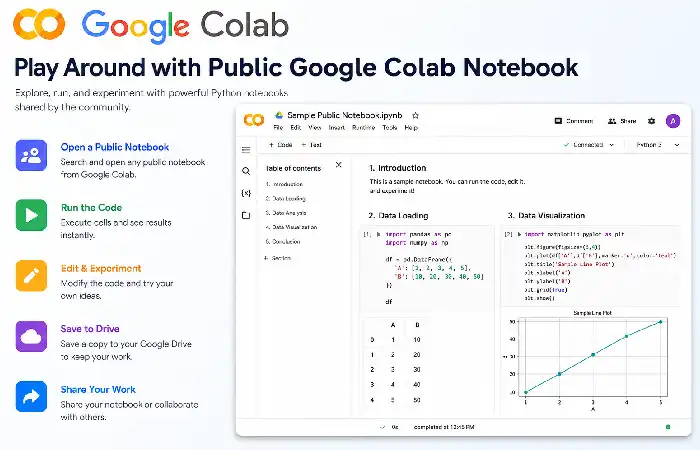
| Feature | Description | Example Activities | Benefits |
| Explore Public Notebooks | Open notebooks shared by the community to learn from real projects. | Browse tutorials, research notebooks, and coding examples. | Learn best practices from experienced users. |
| Run Code Instantly | Execute Python code directly in your browser without installing software. | Test machine learning models, data analysis scripts, or Python examples. | Saves setup time and works on almost any device. |
| Modify Existing Code | Edit notebook cells to experiment with different parameters or algorithms. | Change variables, add functions, or improve visualizations. | Helps you understand how the code works. |
| Use Free Cloud Resources | Run notebooks using Google Colab’s cloud-based CPU, GPU, or TPU (subject to availability). | Train neural networks or process larger datasets. | Faster computation without powerful local hardware. |
| Save Your Own Copy | Make a personal copy of a public notebook to customize it. | Add notes, create experiments, or build your own projects. | Keeps the original notebook unchanged while preserving your work. |
| Collaborate with Others | Share notebooks and work together in real time. | Review code, leave comments, and contribute to group projects. | Makes teamwork and learning more efficient. |
Supported Programming Language
Google Colab primarily supports Python.
It comes with many popular libraries already installed, including:
- NumPy
- Pandas
- Matplotlib
- TensorFlow
- PyTorch
- Scikit-learn
- OpenCV
- Seaborn
- SciPy
- XGBoost
Additional packages can be installed using pip whenever needed.
Google Colab for Machine Learning
Machine learning is one of Colab’s biggest strengths.
Users can:
- Load datasets
- Train models
- Evaluate accuracy
- Visualize results
- Save trained models
Supported frameworks include:
- TensorFlow
- Keras
- PyTorch
- Hugging Face Transformers
Google Colab for Data Science
Data scientists frequently use Colab for:
- Cleaning datasets
- Exploratory Data Analysis (EDA)
- Feature engineering
- Statistical analysis
- Dashboard prototyping
- Report generation
Visualization libraries such as Matplotlib and Plotly make it easy to present findings.
Google Colab for Deep Learning
Training neural networks often requires GPU acceleration.
Google Colab enables users to:
- Train CNNs
- Build RNNs
- Fine-tune Transformers
- Run computer vision projects
- Experiment with generative AI
For larger workloads, paid plans offer more compute resources and longer-running sessions.
Google Colab Pricing
Google Colab is available in multiple tiers.
| Plan | Best For |
| Free | Beginners, students, light workloads |
| Pro | Faster hardware and higher usage limits |
| Pro+ | More compute units, longer runtimes, and more powerful accelerators |
| Enterprise | Organizations using Google Cloud with enterprise management and security features |
Features and quotas may change over time.
Advantages of Google Colab
Some major benefits include:
- Free to start
- No setup required
- Browser-based access
- Easy collaboration
- Automatic notebook saving
- GPU and TPU availability
- AI-assisted coding
- Integration with Google Drive
- Rich visualization support
- Excellent educational resources
Limitations of Google Colab
Despite its strengths, operators should be conscious of some limitations.
Session Timeouts
Inactive notebooks may disconnect automatically.
Limited Resources
Free users may encounter:
- Shared GPUs
- Memory limits
- Usage restrictions
- Queue times during peak demand
Temporary Runtime
Files stored only on the runtime disk may disappear after the session ends unless saved to persistent storage such as Google Drive.
How to Get Started
Getting started is straightforward.
- Sign in with a Google account.
- Open Colab.
- Create a new notebook.
- Write Python code.
- Run cells.
- Save the notebook to Google Drive.
The platform includes sample notebooks to help beginners learn quickly.
Common Use Cases
Google Colab supports many workflows, including:
- Learning Python
- Data visualization
- Image processing
- Natural language processing
- Machine learning
- Deep learning
- AI research
- Academic assignments
- Kaggle competitions
- Portfolio projects
Tips for Better Performance
To make the most of Colab:
- Save notebooks frequently.
- Mount Google Drive for persistent storage.
- Use virtual environments or isolated installs if package conflicts arise.
- Keep datasets organized.
- Release resources when finished.
- Choose GPU or TPU only when required.
Google Colab vs Jupyter Notebook
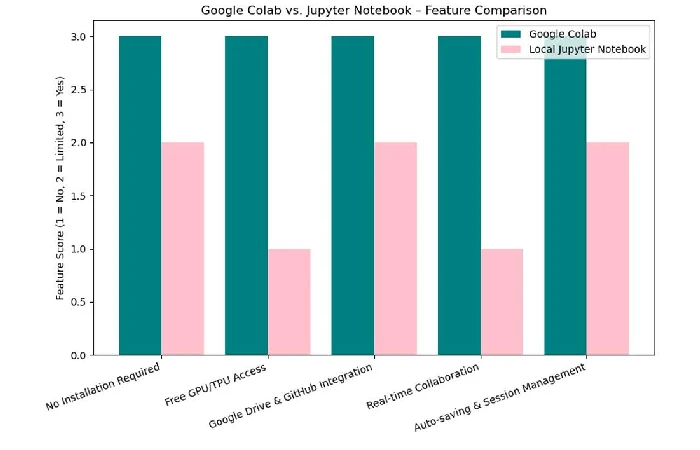
| Feature | Google Colab | Jupyter Notebook |
| Installation | None | Required |
| Cloud Access | Yes | Optional |
| GPU Support | Available in the cloud | Depends on local hardware |
| Collaboration | Built-in | Requires additional setup |
| Storage | Google Drive | Local storage |
| Sharing | Simple link sharing | Manual file sharing |
Best Practices
Follow these recommendations:
- Use descriptive notebook titles.
- Organize code into logical sections.
- Add Markdown explanations.
- Document experiments.
- Use version control when appropriate.
- Back up important notebooks.
- Avoid storing sensitive credentials directly in notebooks.
Frequently Asked Questions
Is Google Colab free?
Yes. The product offers a free tier, and Pro, Pro+, and Enterprise tiers have more computing resources and additional features.
Can machine learning be conducted in Google Colab?
Yes. The product supports such popular machine learning libraries as TensorFlow and PyTorch, and even has cloud GPUs and TPUs to make it possible to conduct machine learning.
Are there collaboration capabilities?
Yes. There are collaboration and sharing options in Google Colab similar to Google Docs.
Can custom Python libraries be installed?
Yes. It is possible to install any additional Python libraries through pip in your Colab session.
Is it appropriate for beginners?
Certainly, since there is no need to install anything and everything is ready, the product is widely used in education. It is faultless for novices to study Python, data science, and AI.
Conclusion
Google Colab is now one of the most multifaceted environments for Python development. With a browser-based notebook interface, collaboration options, access to cloud hardware, and artificial intelligence options, the product is a perfect solution for both beginners and experienced users. You can write your first Python code or do complicated AI experiments using Google Colab.